
Instant Netflix Subtitle Downloader
Overview
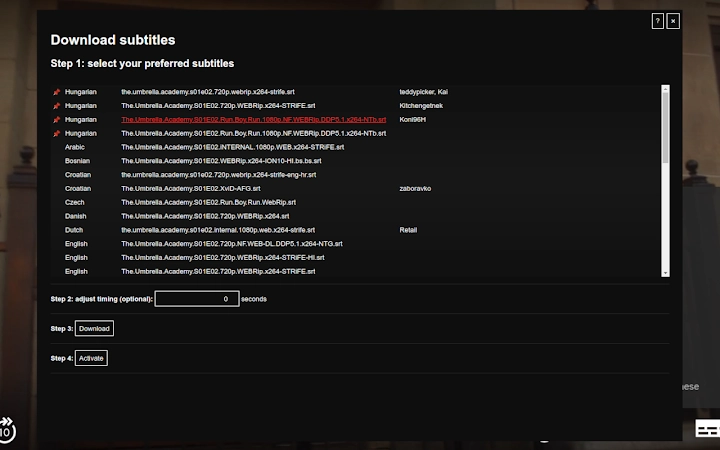
The software enables users to quickly locate and download subtitles for Netflix content in multiple languages. Designed for seamless integration during streaming, it allows users to access subtitles with minimal effort—simply click an icon or press the designated key combination while watching a video. This tool is particularly useful for viewers who need subtitles for language learning, hearing-impaired accessibility, or content comprehension across different languages. The target audience includes casual streamers, language learners, and professionals requiring accurate subtitle access for media analysis.
Developed by SoftPas, the application operates as a desktop utility with a focus on simplicity and efficiency. It functions in the background while users engage with Netflix, requiring no complex setup. Real-world usage scenarios include watching international films with subtitles in the original language, practicing listening skills in a second language, or extracting subtitles for transcription projects. The software does not modify or store streaming content, ensuring compliance with platform usage policies.
Key Features & Capabilities
- One-Click Subtitle Access – Launch subtitle search instantly via a browser icon or keyboard shortcut (D key), reducing interruptions during viewing.
- Multi-Language Support – Retrieve subtitles in various languages, enhancing accessibility for global audiences and multilingual users.
- Seamless Netflix Integration – Works directly within the Netflix streaming environment without requiring app or browser changes.
- Lightweight Design – With a file size of 2.3 MB, the application consumes minimal system resources, making it suitable for older or low-spec devices.
- Offline Subtitle Storage – Saved subtitles can be accessed later without an internet connection, ideal for offline review or study sessions.
Users can benefit from these features when preparing for language exams, analyzing film scripts, or creating educational content. The tool supports rapid subtitle retrieval during long viewing sessions, reducing manual search time. It also aids in content localization efforts by providing accurate, time-synced subtitle files for review.
User Interface, Workflow & Performance
The user interface is minimalistic and designed for quick access. A small icon is visible in the browser toolbar, allowing users to trigger the subtitle search with a single click. The workflow is intuitive: after activation, the software identifies the current Netflix video and fetches available subtitles based on the selected language. Navigation is straightforward, with no additional menus or settings required for basic use.
Performance details were not specified by the developer. However, the lightweight nature of the application suggests efficient operation with low CPU and RAM usage. Stability is expected to be high, given its focused functionality and lack of complex background processes. The software does not interfere with video playback or browser performance, maintaining smooth streaming even during subtitle retrieval.
Compatibility & System Requirements
SoftPas has confirmed compatibility with Windows and Mac operating systems. The application is available in version 1.0.2 and requires 2.3 MB of installation space. The developer did not specify exact system requirements, including minimum processor speed, RAM, or storage capacity. Platform compatibility information is limited to the supported operating systems.
Users should ensure their system meets general desktop application standards to run the software. The application does not require administrator privileges for installation or operation. No known conflicts with other software were reported.
Pros and Cons
Pros
- Instant access to subtitles using a keyboard shortcut or icon
- Supports multiple languages for global usability
- Lightweight and fast, with minimal impact on system resources
- Works seamlessly within Netflix without browser modifications
- Free to use with no hidden costs or ads
Cons
- Exact system requirements were not listed by the developer
- Performance behavior under heavy system load is unknown
- Limited to Netflix streaming platform, no support for other services
- Offline functionality depends on successful prior downloads
- No built-in subtitle editing or translation tools
FAQ Section
Is the software compatible with all versions of Windows and Mac?
The application supports Windows and Mac operating systems, but specific version compatibility was not detailed by the developer.
Is the software secure to use with Netflix?
As a desktop utility that does not alter Netflix content or account data, the software operates within standard streaming parameters. No security risks were reported by the developer.
How often are updates released?
Updates are issued as needed to maintain compatibility and fix bugs. The latest version available is 1.0.2, released on May 15, 2024.
Does the software require an internet connection?
An internet connection is required to search for and download subtitles. Once downloaded, subtitles can be used offline.
Can I use this tool on multiple devices?
Yes, the software can be installed on multiple devices running Windows or Mac, provided each installation follows the terms of use.
Final Thoughts
SoftPas’ Instant Netflix Subtitle Downloader delivers a focused, efficient solution for users seeking quick access to subtitles while streaming. Its minimal design, keyboard shortcut integration, and multi-language support make it a valuable tool for language learners, educators, and casual viewers. Despite limited system requirement details, the lightweight footprint and free pricing enhance its accessibility. The tool excels in its niche, offering a frictionless experience without compromising performance. For anyone regularly watching Netflix and needing subtitles, this software provides a reliable and convenient method to enhance the viewing experience.
Download Instant Netflix Subtitle Downloader now







